plugins
Manage the optional Vite codegen plugins for Surfaces and Side Panels.
plugins scaffolds and inspects optional Vite codegen under chowbea-axios/vite — surfacesCodegen for *.surface.tsx, sidepanelsCodegen for *.panel.tsx. Opt-in. Skip it unless you want build-time discovery and barrel exports for those component patterns.
This has nothing to do with api.op or api.contracts.ts. Different problem, same "don't hand-maintain registries" energy.
See the Vite plugins guide for build-time behavior.
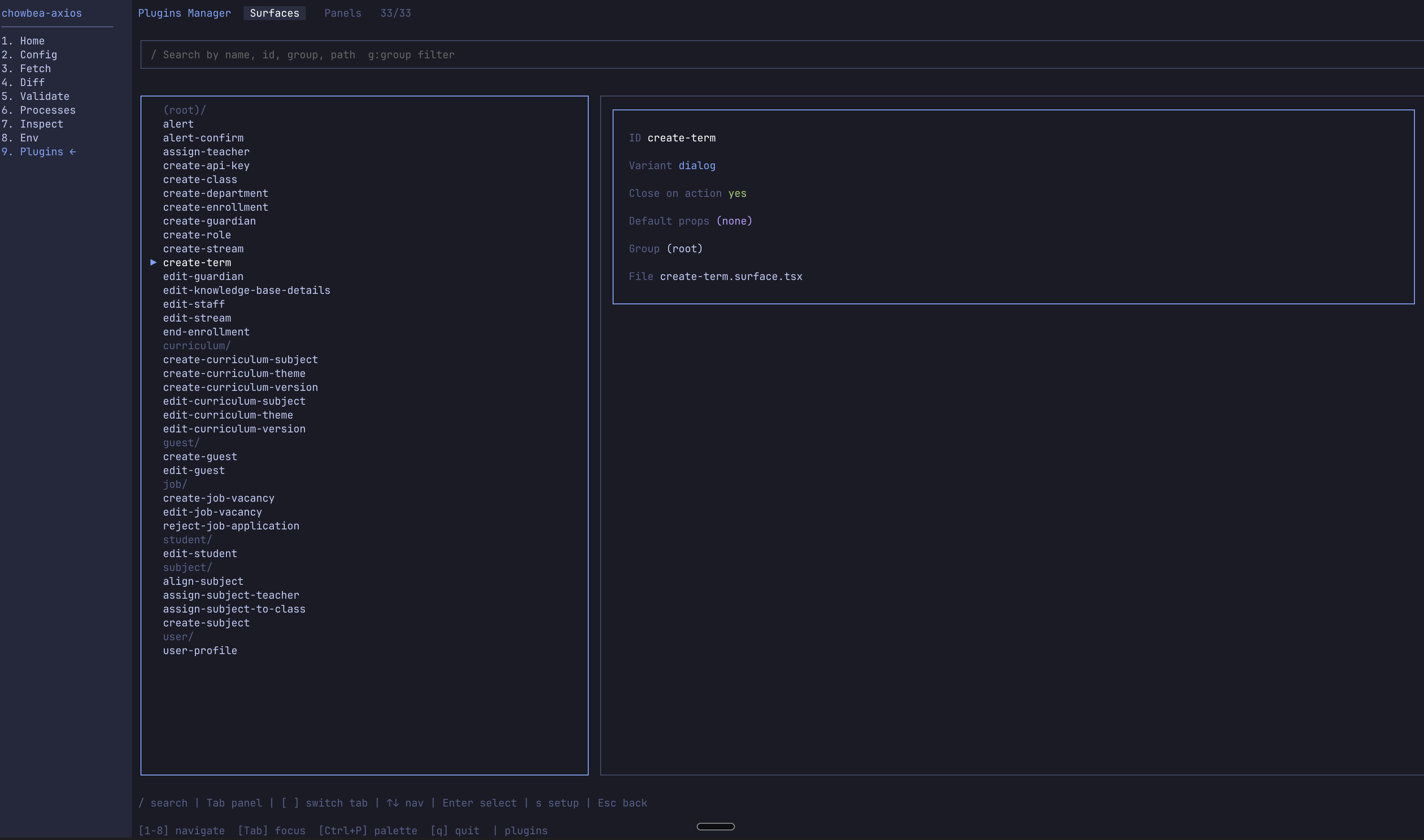 The Plugins Manager in the dashboard does the same discovery interactively.
Usage
chowbea-axios plugins [flags]No flags → list mode. Scans for *.surface.tsx and *.panel.tsx, prints what it found, grouped by folder.
Flags
| Flag | Description |
|---|---|
--setup | Run the plugin setup wizard. Scaffolds the _registry/ folder, sample components, and adds the plugins to vite.config.ts. |
--list | Explicitly list discovered surfaces and panels (the default when no flag is given). |
--add <type:name> | Scaffold a new surface or panel file. type is surface or panel. Supports a group prefix — e.g. surface:user/edit-user writes to <surfacesDir>/user/edit-user.surface.tsx. |
--surfaces-dir <dir> | Override the surfaces directory (default src/components/surfaces). |
--panels-dir <dir> | Override the side panels directory (default src/components/side-panels). |
--quiet, -q | Suppress non-error output. |
--verbose, -v | Show detailed output. |
Examples
List discovered surfaces and panels
chowbea-axios pluginsOutput grouped by folder — surface id, variant, closeOnAction; panel context params and route params.
Set up the plugins from scratch
chowbea-axios plugins --setupThe wizard:
- Creates
src/components/surfaces/_registry/andsrc/components/side-panels/_registry/if missing - Writes registry files (
defineSurface,definePanel, container/layout components, hooks) - Adds
surfacesCodegen()andsidepanelsCodegen()tovite.config.ts
Also available during init: chowbea-axios init --with-vite-plugins.
Scaffold a new surface
chowbea-axios plugins --add surface:edit-user
chowbea-axios plugins --add surface:user/edit-user
Scaffold a new panel
chowbea-axios plugins --add panel:user/staff-profileUse custom directories
chowbea-axios plugins --list \
  --surfaces-dir app/ui/surfaces \
  --panels-dir app/ui/panels
What gets generated at build time
When Vite runs, each plugin writes a barrel inside _registry/ — surface-definitions.gen.ts / panel-definitions.gen.ts. Re-exports every matching file with types from the plugin's Surface / Panel export. Import from _registry, not the generated file directly.
The plugins command never edits files you wrote — only new scaffolds and generated _registry/ artifacts. Customize defineSurface / definePanel metadata freely; re-scans preserve it.