Configuration
api.config.toml — the one file that decides where your types come from.
Everything interesting starts in api.config.toml at your project root. Miss a key, and you’ll spend an afternoon wondering why Vite can’t see API_BASE_URL. Nail it once, and fetch / watch / generate stop being mysteries.
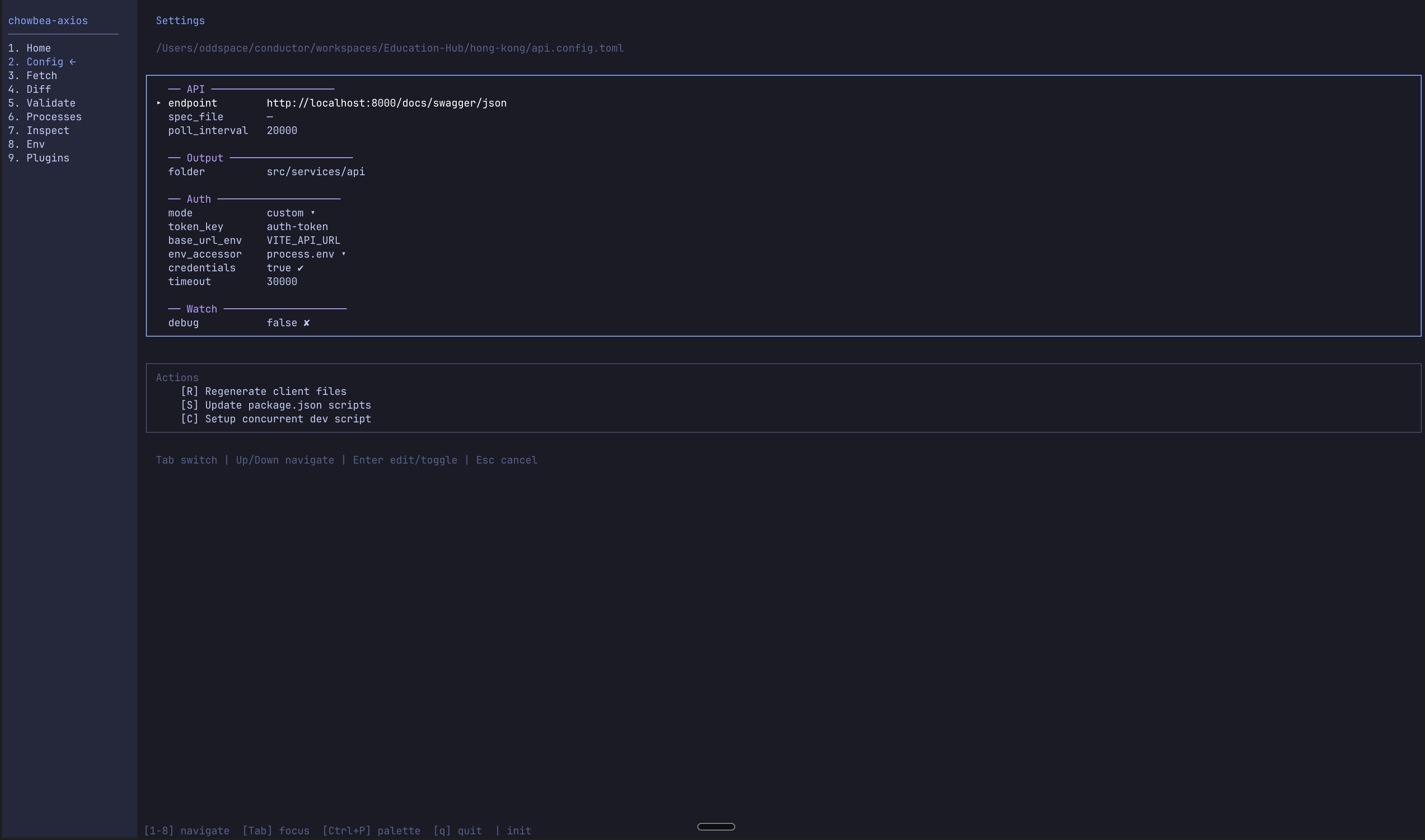 You can poke these values on the Config screen of the interactive dashboard if clicking feels better than scrolling TOML.
Full reference
# Remote OpenAPI spec URL (optional when spec_file is set)
api_endpoint = "http://localhost:3000/openapi.json"

# Committed/local spec path. Offline commands (generate, diff, validate)
# read it; live commands (fetch, watch) prefer api_endpoint when that's
# also set. Setting BOTH enables pinned-inputs mode.
# spec_file = "./openapi.json"

# Watch polling interval (ms). Floor is 1000.
poll_interval_ms = 10000

[output]
folder = "src/api"

[instance]
base_url_env = "API_BASE_URL"
# "process.env" for Node/Next, "import.meta.env" for Vite
env_accessor = "process.env"
token_key = "auth-token"
# "bearer-localstorage" | "custom" | "none"
auth_mode = "custom"
# Cookies / credentialed cross-origin requests
with_credentials = false
timeout = 30000

# Optional: headers when fetching the *spec* (not your API calls)
# [fetch.headers]
# "X-Internal-Token" = "$SPEC_TOKEN"

# Optional: Basic Auth for a locked-down swagger endpoint
# [fetch.auth]
# type = "basic"
# username = "$SWAGGER_USER"
# password = "$SWAGGER_PASS"

# Optional: Type Bus. Adding `file` pins the manifest (pinned-inputs mode).
# [bus]
# endpoint = "https://staging.example.com/.well-known/chowbea.json"
# file = "chowbea.bus.json"

[watch]
debug = false
Root options
| Option | Type | Default | Description |
|---|---|---|---|
api_endpoint | string | — | Remote OpenAPI URL. Optional if spec_file is set. |
spec_file | string | — | Local JSON/YAML spec. Offline commands read it; fetch/watch prefer api_endpoint when both are set (v3). Both set = pinned inputs. |
poll_interval_ms | number | 10000 | Watch interval (ms). Minimum 1000. |
You need api_endpoint or spec_file. Prefer a local file when CI shouldn’t depend on a sleepy staging box.
[output]
| Option | Type | Default | Description |
|---|---|---|---|
folder | string | "src/api" | Where generated files land |
Columbus uses src/services/api. Use whatever matches your brain’s folder taxonomy.
[instance]
These bake into api.instance.ts on first generate. After that, the file is yours — regenerate won’t silently rewrite your refresh-queue masterpiece (it may warn if config drifts).
| Option | Type | Default | Description |
|---|---|---|---|
base_url_env | string | "API_BASE_URL" | Env var name for the Axios base URL |
env_accessor | string | "process.env" | "process.env" or "import.meta.env" |
auth_mode | string | "custom" | "bearer-localstorage", "custom", or "none" |
token_key | string | "auth-token" | localStorage key for bearer-localstorage |
with_credentials | boolean | false | Axios withCredentials |
timeout | number | 30000 | Timeout in ms |
Default with_credentials is false. Set it true only when you actually need cookies on cross-origin calls — not because it sounds enterprise.
[fetch.headers]
Optional headers attached when the CLI downloads the OpenAPI spec. Not your runtime API headers.
[fetch.headers]
"X-Internal-Token" = "$SPEC_TOKEN"
"X-Env" = "staging"
Values support $VAR / ${VAR} interpolation.
[fetch.auth]
HTTP Basic Auth for a protected swagger endpoint. That’s it for now — no OAuth scavenger hunt in the CLI.
| Option | Type | Description |
|---|---|---|
type | string | Must be "basic" |
username | string | Supports env interpolation |
password | string | Supports env interpolation |
[fetch.auth]
type = "basic"
username = "$SWAGGER_USER"
password = "$SWAGGER_PASS"
Unset vars → interactive prompt on a TTY, hard fail in CI. As it should be.
[bus]
| Option | Type | Default | Description |
|---|---|---|---|
endpoint | string | — | URL of the served chowbea.bus.json (conventionally /.well-known/chowbea.json) |
file | string | — | Repo-relative path of the committed manifest pin (e.g. "chowbea.bus.json"). Setting it enables pinned inputs for the bus; requires endpoint. |
See Consuming the bus for what lands on disk.
[watch]
| Option | Type | Default | Description |
|---|---|---|---|
debug | boolean | false | Cycle-by-cycle logs when you’re debugging “why didn’t it regenerate?” |
Local overrides — api.config.local.toml
Per-dev endpoints (ports, tunnels) don't belong in a committed file. Drop a gitignored api.config.local.toml next to api.config.toml:
api_endpoint = "https://my-tunnel.ngrok.app/openapi.json"

[bus]
endpoint = "https://my-tunnel.ngrok.app/.well-known/chowbea.json"
Field-level merge, local wins; nested tables merge per key (your [bus].endpoint override keeps the committed [bus].file); precedence is CLI flags → local → committed. fetch, generate, and watch apply it and log which keys are overridden. sync ignores it entirely — pins only ever come from the committed config. [fetch.headers] and [fetch.auth] overlay the same way.
Env interpolation
Works for [fetch.auth] and [fetch.headers]:
username = "$SWAGGER_USER"
password = "${SWAGGER_PASS}"
Framework snippets
Vite / React
api_endpoint = "http://localhost:3000/api-docs/json"

[output]
folder = "src/services/api"

[instance]
base_url_env = "VITE_API_URL"
env_accessor = "import.meta.env"
Next.js
api_endpoint = "http://localhost:3000/api-docs/json"

[output]
folder = "lib/api"

[instance]
base_url_env = "NEXT_PUBLIC_API_URL"
env_accessor = "process.env"
Spec-file-only
spec_file = "./openapi.json"

[output]
folder = "src/api"
No remote URL. fetch, generate, watch, diff, and validate all read the file.
Multiple configs
chowbea-axios fetch --config api.config.payments.tomlUseful when one monorepo worships more than one OpenAPI god.